 GPT Image 2 is now available — try the latest OpenAI image model in your video projects.✨
 AIStory.Video
New: Better Story Scripts and Scene Lists for Short Videos

Story videos have two souls: the script and the characters.
In our last update, we gave creators more control over characters before a video is created. This time, we focused on the other half of the story: the script and the scene list.
The goal is simple. A story video should not begin with slow background information. It should open with a reason to keep watching.
What changed
aistory.video now generates story scripts and scene lists with a stronger short-form structure.
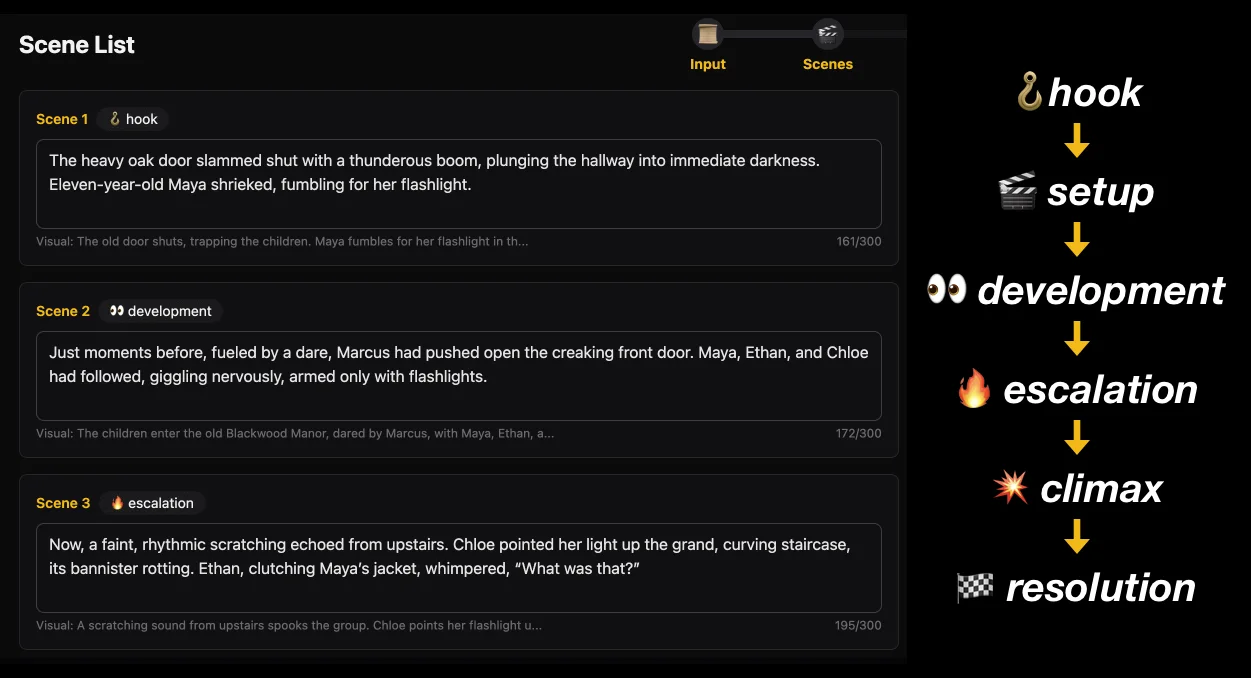
The creation flow still feels the same. You can start from a prompt or a script, review the scene list, choose your style and characters, then generate the video. But behind the scenes, the story generation step is more intentional now.
The biggest improvements are:
- stronger hook-first openings
- story-aware script structure
- clearer scene functions
- better scene-to-scene retention flow
- longer prompt input for prompt-to-video creation
Why the scene list matters so much
For YouTube Shorts and TikTok, the scene list is not just production planning. It is the retention curve.
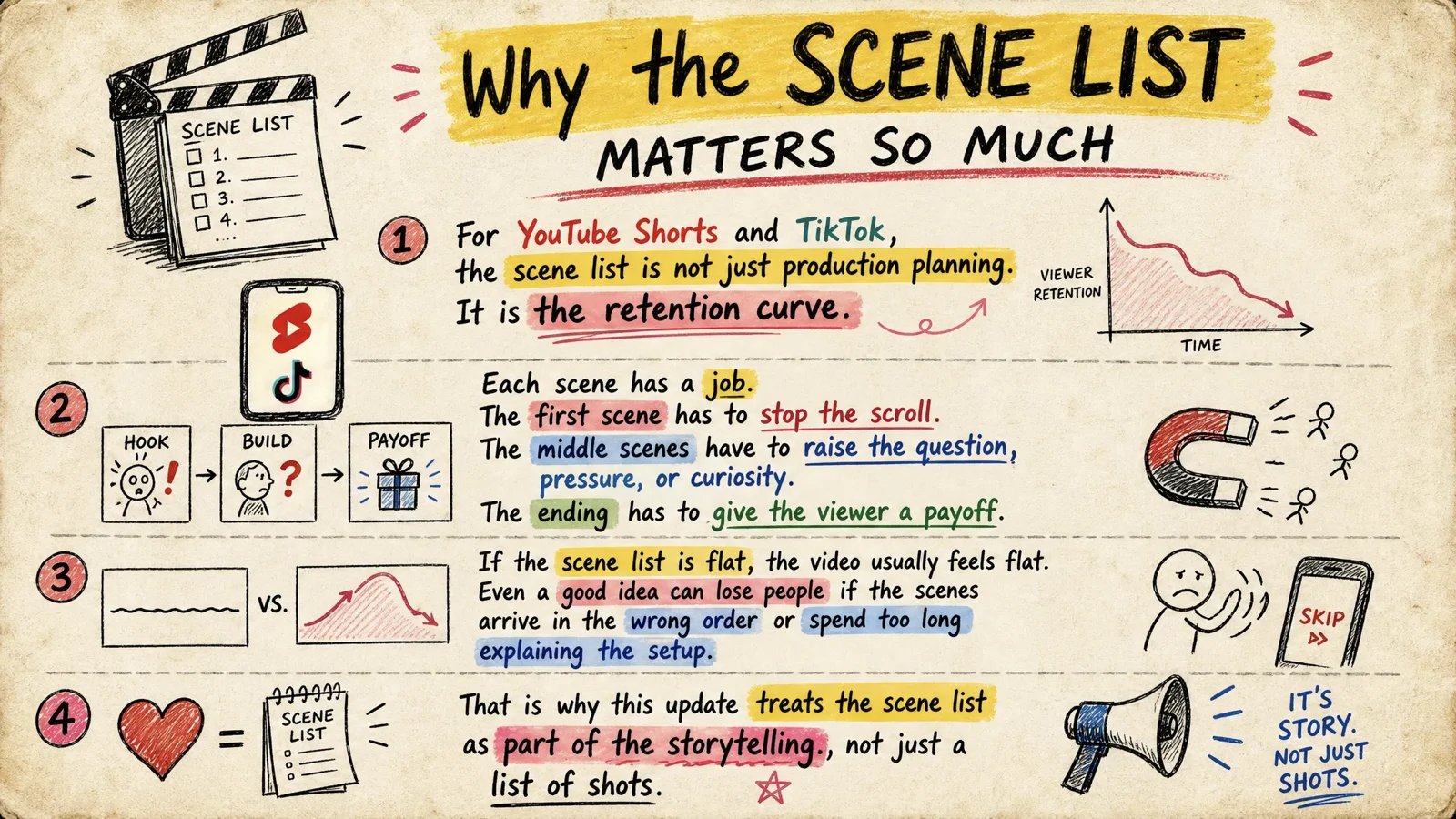
Each scene has a job. The first scene has to stop the scroll. The middle scenes have to raise the question, pressure, or curiosity. The ending has to give the viewer a payoff.
If the scene list is flat, the video usually feels flat. Even a good idea can lose people if the scenes arrive in the wrong order or spend too long explaining the setup.
That is why this update treats the scene list as part of the storytelling, not just a list of shots.
Hook-first story generation
Hooks come first in short video. That is not a trick. It is the format.
Before this update, AI-generated story videos could sometimes begin too politely. They would explain the world, introduce the background, then slowly arrive at the interesting part.
That is dangerous for Shorts and TikTok. Most viewers decide quickly.
Now, aistory.video pushes the strongest moment closer to the start. That might be:
- a conflict
- a mystery
- a strange contrast
- a warning
- a preview of the climax
The background still matters. It just does not need to be the first thing the viewer hears.
Story structure is now chosen automatically
Different stories need different shapes.
Some stories work best as conflict and reversal. Some need suspense. Some are better as an explanation or list. The creator should not have to manually pick a structure every time.
Now aistory.video can organize the script around the structure that fits the idea:
- conflict and reversal
- mystery and reveal
- curiosity-driven explanation
This makes the output feel less like a generic plot summary and more like a video designed to be watched all the way through.
Scene functions make the rhythm easier to read
Each scene now has a clearer narrative function in the scene list.
You may see labels like:
- hook
- setup
- development
- escalation
- twist
- climax
- resolution
- cta
These labels help you understand the rhythm at a glance. You can quickly see whether the story starts strong, whether the middle keeps building, and whether the ending actually resolves something.
They also make editing easier. If a scene is marked as escalation but does not raise the pressure, you know what to fix.
Better for series creators
This update pairs naturally with our recent character customization update.
Characters make a series recognizable. Scripts and scene lists make each episode worth watching.
If you are building a YouTube channel or TikTok account, that combination matters. A good series needs more than a reusable hero. It needs repeatable storytelling rhythm:
- a fast opening
- a clear conflict
- a reason to watch the next scene
- a payoff that feels complete
That is true for hero stories, kids stories, Bible stories, history shorts, faceless channels, and almost any story-led vertical format.
Longer prompts for better ideas
We also increased the prompt-to-video input limit in the create flow from 300 characters to 2000 characters.
That gives you more room to describe the story you actually want:
- the main character
- the conflict
- the setting
- the tone
- the twist
- the lesson or ending
Short prompts are still fine. But when you have a fuller idea, you no longer have to compress it into a tiny box.
Start with a stronger story
If you already have a script, you can use it as the starting point.
If you only have an idea, describe the premise, the character, and the conflict. aistory.video will help turn that into a scene list with a stronger hook and a clearer story path.
You can also use Story Script Generator to draft the story first, then move into Create to build the video.
If you want to turn a story idea into a short video with a stronger opening and better scene flow, start here: Create with aistory.video
Related links
- Create a story video with aistory.video
- Story Script Generator
- Customize Characters Before Creating Your Story Video
- How to Make Hero Story Videos with AI
- David and Goliath Shorts Case Study
FAQ
What is a story scene list?
A story scene list is the sequence of scenes that turns a script or idea into a video structure. In a short video, it controls the pace, hook, buildup, and payoff.
Why does the hook matter so much?
The hook gives viewers a reason to stay in the first few seconds. Without it, even a good story can lose people before the main conflict begins.
Do I need to choose a story structure manually?
No. aistory.video now chooses a suitable structure automatically based on the story idea or script.
Can I write longer prompts now?
Yes. Prompt-to-video input in the create flow now supports up to 2000 characters, so you can describe richer story ideas before generation.